
Security
Security headers, HTTPS and HSTS: what a scanner sees in seconds
Security headers, a valid certificate and HSTS are the first things any scanner checks. HSTS is on 36% of pages and CSP on 22%. What to set, in what order.

Summarize with AI
Short on time? Open this article in your AI assistant with a ready-made prompt.
- ChatGPT (opens in a new tab with a summary prompt)
- Perplexity (opens in a new tab with a summary prompt)
- Grok (opens in a new tab with a summary prompt)
Claude and Gemini open with the prompt copied: paste it to start.
On this page
- What does a scanner check in the first second?
- Why does HTTPS still need attention in 2026?
- What is HSTS and why is it the first header to add?
- Do security headers affect Google rankings?
- Which security headers matter, and what should they say?
- How do you add security headers without breaking the site?
- How does ContentMas help with security headers and HTTPS?
- Key takeaways
- Frequently asked questions
Short answer
In short: security headers, a valid HTTPS certificate and a correct HTTP-to-HTTPS redirect are the first things any scanner, browser or crawler reads about your website, and it reads them in the first response, before a single word of content. HTTPS itself is nearly universal (98.8% of mobile requests in the 2025 Web Almanac), but the headers that make it stick are not: HSTS appears on 36% of mobile pages and Content-Security-Policy on 21.9%.1 Google says HSTS does not affect Search, and Chrome 154 now asks permission before loading any public site over plain HTTP, so these headers are about keeping visitors, not winning rankings.23 Set HTTPS with a valid certificate, redirect HTTP to HTTPS on the same host, add Strict-Transport-Security, X-Content-Type-Options, X-Frame-Options or frame-ancestors, Referrer-Policy and a Content-Security-Policy, in that order, and check the certificate expiry date now that lifetimes are shrinking to 47 days.456
Someone runs a free scanner against your website. Thirty seconds later they have a letter grade, a red list and a question for you: why is this missing? The scanner did not read your content, your prices or your reviews. It read the response headers of one page.
Security headers are the part of a website nobody sees and every tool checks. This article explains what those checks look at, what the measured web actually does, which headers matter and in what order, and how to set them without breaking the site.
What does a scanner check in the first second?
Four things, all from the first HTTP response: whether the page is served over HTTPS with a valid certificate, whether the HTTP version redirects to HTTPS on the same host, which security headers come back, and what they say. None of this needs the page body, so a scanner can grade a site before the HTML has loaded.
The baseline for most of these tools is MDN's HTTP Observatory. It starts every site at 100 points, deducts penalties for missing or weak protections, and adds bonuses only if the result is already 90 or more; the highest possible score is 145 and the grades run from A+ (100 and above) to F (0 to 24).7 It also checks the redirect order: http://example.com should go to https://example.com first and only then to https://www.example.com; a redirect straight from HTTP to the www HTTPS address is "an incorrect (and penalized) redirection."7
That is the scanner's view. The browser's view matters more, because every visitor runs one.
Why does HTTPS still need attention in 2026?
Because the last few percent of HTTP is now visible to visitors. Chrome's security team wrote in October 2025 that the share of Chrome navigations using HTTPS rose from "around 30-45% in 2015" to "the 95-99% range around 2020," then plateaued, and that "a few percentage points of HTTP navigations is still a lot of navigations."2 Their response is a default change: with Chrome 154 in October 2026, "Chrome will ask for the user's permission before the first access to any public site without HTTPS."2 The setting, Always Use Secure Connections, was switched on in April 2026 for Enhanced Safe Browsing users and is now the default for everyone; private addresses such as 192.168.0.1 are excluded, and Chrome warns only on a new or not recently visited site.2
The same post makes a point that catches many sites: a lot of HTTP is "only for redirects to HTTPS," which was invisible to users before and is not now.2 If an old link, a printed URL or a bookmark still starts with http://, the first visit shows a warning before your redirect runs.
Google's Search guidance is simple: "Google strongly recommends using HTTPS for your site to protect your users' security and privacy. If your site has a page with both an HTTP and HTTPS address, Google prefers to index the HTTPS version."8 Search Console's HTTPS report lists the ways a site fails that test: an invalid certificate ("Typically this affects an entire site"), an HTTPS URL that redirects to HTTP, a sitemap that points to HTTP URLs, an HTTP page that declares itself canonical, and an HTTPS URL blocked by robots.txt.8 It adds a warning worth reading twice: "If a site has a lot of HTTPS issues, it can prompt Google to stop crawling your HTTPS pages."8
So the problem is rarely "no HTTPS." It is an expired certificate, a certificate for the wrong host name, a redirect that goes the wrong way, or a page that loads one image over HTTP. Those are what the scanner flags, and what the browser now shows the visitor.
What is HSTS and why is it the first header to add?
HSTS (HTTP Strict Transport Security) is one response header, Strict-Transport-Security, that tells the browser to use HTTPS for your domain on every future visit without trying HTTP first. MDN's definition: it "informs browsers that the host should only be accessed using HTTPS, and that any future attempts to access it using HTTP should automatically be upgraded to HTTPS. Additionally, on future connections to the host, the browser will not allow the user to bypass secure connection errors, such as an invalid certificate."9
Three details decide whether it works.
1. It only counts over HTTPS
"Browsers ignore the header if sent over HTTP," because otherwise an attacker on the network could rewrite it.9 Sending HSTS on the HTTP response does nothing; it has to be on the HTTPS response, including HTTPS redirects.94
2. It does not protect the first visit
"One weakness of HSTS is that it does not take effect until the browser has made at least one secure connection to the host and received the Strict-Transport-Security header."9 The first http:// request is unprotected. The preload list exists for that gap: Chrome ships a built-in list of domains that are HTTPS only, and Firefox, Safari and Edge build their lists from it.4
3. Preloading is hard to undo
To be preloaded, a site must serve a valid certificate, redirect HTTP to HTTPS on the same host, serve every subdomain over HTTPS, including internal ones, and send max-age of at least 31536000 seconds (one year) with includeSubDomains and preload.4 The site that runs the list warns that "inclusion in the preload list cannot easily be undone" and that removal "takes months for a change to reach users with a Chrome update," so it asks you not to request inclusion "unless you're sure that you can support HTTPS for your entire site and all its subdomains in the long term."4 Its deployment advice is to ramp up: max-age=300 for five minutes of testing, then 604800 (a week), then 2592000 (a month), waiting the full period at each stage and watching for broken pages before raising it.4
The measured web shows how far most sites get. In the 2025 Web Almanac, 36% of mobile pages sent HSTS, "a rise of 6 percentage points compared to last edition"; 96% of those had a valid max-age, the median was 365 days, about 40% included subdomains and about 22% had the preload directive.1
Do security headers affect Google rankings?
No, and Google has said so directly. Asked in a 2023 Search Central office hours whether HSTS has a ranking influence, John Mueller answered: "No, the HSTS header does not affect Search." Google uses canonicalization to choose which version of a page to index and "does not rely on headers like those used for HSTS," he explained, then added: "Using these headers is of course great for users though."3
That is the right frame for every header here. They do not earn a position. They stop a visitor from seeing a warning, stop injected scripts from running, stop your pages being framed by someone else's site, and stop a certificate error from being clicked through. An AI assistant that recommends your site and a customer who clicks the link both arrive at the same first response; the guide to website security and trust covers what happens when that response is a warning page.
Which security headers matter, and what should they say?
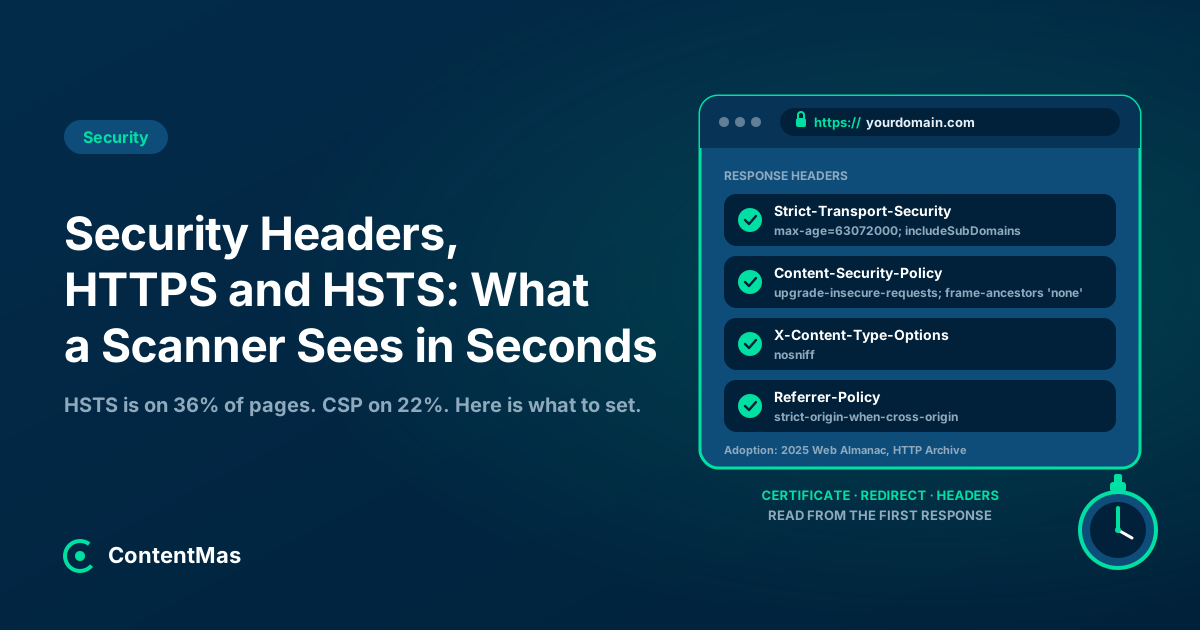
Six headers cover what browsers enforce today. The values below are the OWASP cheat sheet's recommendations; the adoption figures are from the 2025 Web Almanac.51
| Header | Recommended value | What it prevents | Share of mobile pages (2025) |
|---|---|---|---|
| Strict-Transport-Security | max-age=63072000; includeSubDomains; preload (ramp up first) | HTTP downgrade, clicked-through certificate errors | 36% |
| X-Content-Type-Options | nosniff | The browser guessing file types and running a file as script | Nearly 50% |
| X-Frame-Options / CSP frame-ancestors | DENY, or frame-ancestors 'none' in CSP | Your pages being framed inside another site (clickjacking) | About 30% (X-Frame-Options) |
| Referrer-Policy | strict-origin-when-cross-origin | Full URLs, including query strings, leaking to other sites | Not reported in the 2025 chapter |
| Content-Security-Policy | A per-site allow-list; start with Report-Only | Injected scripts and mixed content | 21.9% |
| Permissions-Policy | geolocation=(), camera=(), microphone=() | Embedded content using device features | 3.7% |
Sources: values from OWASP; adoption from the 2025 Web Almanac.51
Two headers should go the other way. OWASP says to "Remove all X-Powered-By headers" and to remove or blank the Server header, because both tell an attacker which software and version to target.5 The old X-XSS-Protection header should be set to 0 or left out, since "in some cases, this header can create XSS vulnerabilities in otherwise safe websites."5
Content-Security-Policy deserves a note of realism. OWASP calls it "complex to configure and maintain."5 The Web Almanac found that "most websites use CSP for the upgrade-insecure-requests and frame-ancestors directives," the easy, safe parts, and that 92% of the policies that restrict scripts still allow unsafe-inline, which removes most of the protection.1 A short policy that upgrades insecure requests and blocks framing is a real improvement; a strict script policy is a project.
How do you add security headers without breaking the site?
One at a time, on a staging copy first, with a test after each, from the lowest risk to the highest.
Step 1: Fix the certificate and the redirect
Open http://yourdomain.com in a private window and watch where it goes. It should land on https://yourdomain.com (same host) and only then on www or another host if that is your canonical.7 Check that the certificate covers both the bare domain and www, and note its expiry date. Search Console's HTTPS report shows which indexed URLs are still HTTP and why.8
Step 2: Add the three safe headers
X-Content-Type-Options: nosniff, Referrer-Policy: strict-origin-when-cross-origin and X-Frame-Options: DENY (or SAMEORIGIN if you frame your own pages) break almost nothing on a normal website.5 For a page you embed elsewhere on purpose, such as a booking widget, use CSP frame-ancestors with the allowed domain instead.5
Step 3: Turn on HSTS with a short max-age
Start with Strict-Transport-Security: max-age=300; includeSubDomains and open every subdomain you have, including staging, mail and internal tools.4 Anything that only works over HTTP will stop working for anyone who has visited the main site. Raise the value in stages to a week, a month, then a year or two, and leave preload off until the whole domain has run on HTTPS for months.4
Step 4: Start a Content-Security-Policy in Report-Only mode
Begin with Content-Security-Policy-Report-Only and a policy of upgrade-insecure-requests; frame-ancestors 'none', then add script and style sources as the reports show what the site loads.5 Switch to the enforcing header only when the reports are quiet; a strict policy set too early breaks analytics, chat widgets and forms.
Step 5: Hide the software versions
Remove X-Powered-By and set Server to a non-informative value.5 Visitors notice nothing; attackers lose a free hint.
Step 6: Automate the certificate renewal
This step is new in 2026. In April 2025 the CA/Browser Forum, the body of certificate authorities and browser makers, passed ballot SC-081v3 with 25 certificate authorities and all four browser makers (Apple, Google, Microsoft and Mozilla) voting yes, for an "Eventual reduction of maximum validity period from 398 days to 47 days," with the reductions "starting in March 2026 and concluding in March 2029."6 The first step took effect on 15 March 2026, when the maximum validity fell to 200 days; it falls to 100 days on 15 March 2027 and to 47 days on 15 March 2029.10 A certificate renewed by hand once a year now expires mid-year. If your host or CDN renews automatically (most do, through the ACME protocol), confirm it; if someone renews manually, that job is about to become a monthly one.10
How does ContentMas help with security headers and HTTPS?
ContentMas is an AI-powered SEO tool that audits your website for Google and AI search engines, and shows exactly what to fix to rank higher and get cited. Its Security pillar reads the same first response a scanner does: HTTPS with a valid certificate, mixed content on HTTPS pages, HSTS, Content-Security-Policy, clickjacking protection (X-Frame-Options or frame-ancestors), X-Content-Type-Options, Referrer-Policy, Permissions-Policy, Cross-Origin-Opener-Policy, and whether X-Powered-By and the server version are hidden. Each finding comes with the header value to send and a priority, so the fixes above arrive as a list in the order they should be done.
The Security pillar runs alongside Content Freshness, Content Quality, Trust & Authenticity, SEO & GEO Readiness (visibility in Google and AI search engines; GEO means Generative Engine Optimization) and Technical Readiness, across 700+ KPIs. The free plan reads up to 10 pages per scan, 3 scans per 24 hours. See how we score or run an audit.
Key takeaways
- Scanners grade the first HTTP response: certificate, redirect and headers. MDN's HTTP Observatory starts at 100 points, deducts for what is missing, and penalizes a redirect that skips the same-host HTTPS step.7
- HTTPS is nearly universal (98.8% of mobile requests), but HSTS is on 36% of mobile pages and Content-Security-Policy on 21.9%.1
- Chrome 154 (October 2026) asks permission before the first visit to any public site over HTTP, including sites that use HTTP only to redirect.2
- Google says "the HSTS header does not affect Search" and that these headers are "great for users"; Search Console's HTTPS report shows which indexed URLs still fail HTTPS.83
- HSTS only works over HTTPS, does not cover the first visit, and is hard to undo once preloaded; ramp
max-agefrom 5 minutes to a year and addpreloadlast.94 - Certificate lifetimes fell to 200 days in March 2026 and reach 47 days in March 2029, so renewal must be automated or scheduled.610
None of this is visible on the page, and none of it moves a ranking. It decides whether the visitor who found you, through Google or an AI answer, reaches the page without a warning. That is the cheapest trust signal a website has, and it takes an afternoon.
Related reading: How Website Security Affects Rankings and Customer Trust and Trust Signals That Make AI Assistants Recommend Your Website
The six-pillar guides: Technical · Content quality · Trust · Freshness · Security · SEO and GEO · How ContentMas scores each pillar
Frequently asked questions
Are security headers a Google ranking factor?
No. Google's John Mueller said in 2023 that "the HSTS header does not affect Search" and that Google picks the version of a page to index through canonicalization, not headers, while adding that "Using these headers is of course great for users though."3 HTTPS itself is a separate, lightweight signal, and Google prefers to index the HTTPS version of a page when both exist.8
What is the difference between HTTPS and HSTS?
HTTPS is the encrypted connection and the certificate behind it. HSTS is a response header that tells the browser to use HTTPS for your domain on every future visit and not to let the user click through a certificate error.9 HTTPS works without HSTS; HSTS does nothing without HTTPS, because browsers ignore the header when it arrives over HTTP.9
Which security headers should a small website set first?
Start with the three that break almost nothing: X-Content-Type-Options: nosniff, Referrer-Policy: strict-origin-when-cross-origin and X-Frame-Options: DENY.5 Then add Strict-Transport-Security with a short max-age and raise it in stages, and finish with a Content-Security-Policy tested in Report-Only mode.45
Should I add my domain to the HSTS preload list?
Only once every subdomain, including internal ones, has run on HTTPS for a long time. The preload list requires a one-year max-age with includeSubDomains and preload, and the site that runs it warns that inclusion "cannot easily be undone" and that removal takes months to reach users.4
How often do SSL certificates need renewing now?
Since 15 March 2026 a public certificate can be valid for at most 200 days; from 15 March 2027 it is 100 days, and from 15 March 2029 it is 47 days, under the CA/Browser Forum's ballot SC-081v3.610 Most hosts and CDNs renew automatically through the ACME protocol; if yours does not, set up automation or a renewal reminder before the next expiry.10
References
Each numbered marker in the article links to its source below.
-
HTTP Archive — Security, Web Almanac 2025 (opens in a new tab), January 2026. ↩
-
Google Online Security Blog — HTTPS by default (opens in a new tab), October 2025. ↩
-
Search Engine Journal — Google Answers If Security Headers Offer Ranking Influence (opens in a new tab), June 2023. ↩
-
hstspreload.org — HSTS Preload List Submission (opens in a new tab), accessed November 2026. ↩
-
OWASP Cheat Sheet Series — HTTP Security Response Headers Cheat Sheet (opens in a new tab), accessed November 2026. ↩
-
CA/Browser Forum — Ballot SC-081v3: Introduce Schedule of Reducing Validity and Data Reuse Periods (opens in a new tab), April 2025. ↩
-
MDN Web Docs — HTTP Observatory: Scoring Methodology (opens in a new tab), accessed November 2026. ↩
-
Search Console Help — HTTPS report (opens in a new tab), accessed November 2026. ↩
-
MDN Web Docs — Strict-Transport-Security header (opens in a new tab), accessed November 2026. ↩
-
Sectigo — 200-day certificate expiration begins (opens in a new tab), September 2026. ↩
About this article
Written by Nasir Ali Joiya. Nasir Ali Joiya is a software engineer and the CEO and Co-Founder of ZAPTA Technologies, an AI-native software company in Lahore whose group has more than 150 engineers. Reviewed by the ContentMas Team, who build ContentMas, an AI-powered SEO audit tool that checks sites across six pillars for Google and AI search engines. Facts and figures link to their original sources in the References. Spotted something out of date? Tell us and we will correct it.
Free website audit
See how your site scores for search engines and AI assistants.
One score, six pillar scores and a ranked fix list in a few minutes. No credit card.
Start free audit