
Content Freshness
Is Your Website Out of Date? 7 Signs Google and AI Assistants Notice
Old years in copy, stale stats, broken links and mismatched dates are the clearest signs. Here is how to check each one and what to fix first.
On this page
Short answer
In short: a website is out of date when its copy, facts, links and dates no longer match the present. The seven clearest signs are old years in copy, stale statistics, broken links, mismatched dates, date bumps without real changes, old screenshots or prices, and expired pages that are still live. Each one can be checked in minutes, and most can be fixed in an afternoon.
Your traffic is not falling off a cliff. It is sliding a little each month, and nothing in your analytics explains why.
Often the site has simply aged. A "2023 guide" in the title, a five-year-old statistic, a link that goes nowhere. Each is small. Together they tell search engines, AI assistants and visitors that nobody is looking after the page.
Why does outdated website content cause a slow traffic drop?
Outdated content loses ground because newer, more accurate pages become the better answer, and search systems are built to prefer the better answer. For some queries, age matters directly: Google says it runs various "query deserves freshness" systems that show fresher content where people would expect it.1
Broken pages cost you more directly. Google does not index URLs that return a 4xx status code, and URLs already in the index are removed once they start returning one.2
AI assistants raise the stakes. In the research paper that coined the term generative engine optimization, adding citations, quotations and statistics to a source page boosted its visibility in generative engine answers by over 40% across various queries.3 In our view, the reverse also holds: a page whose numbers are old gives an assistant little reason to quote it.
This post is a diagnostic. If you already know a page is decaying and want the refresh process, read why content decay is silently killing your SEO rankings.
What are the 7 signs your website is out of date?
These are the signs we see most often. Each one has a quick check.
1. Old years in titles and copy
The fastest tell is a year that has passed: "Best tools for 2023," "our 2022 pricing," "as of last year." Readers spot it in the search result before they click.
How to check: search your site for the last three or four years, for example site:yourdomain.com "2023" in Google, or a text search in your CMS. Pay special attention to titles, meta descriptions and H1s.
2. Statistics nobody has re-checked
A stat that was true when you published may have a newer edition now. In our view, old numbers are worse than none, because they look authoritative while being wrong.
How to check: list every number on your top 10 pages and open each source. Is there a newer report? Does the link still work? If you cannot trace a number, treat it as unverified.
3. Broken links and 404 pages
Links rot faster than most teams expect. Pew Research Center found that 38% of webpages that existed in 2013 were no longer accessible a decade later, and 23% of news webpages contained at least one broken link.4 Ahrefs found that at least 66.5% of links to the 2+ million sites it studied had rotted since 2013.5
How to check: in Google Search Console, open the Pages report and look for "Not found (404)" and "Soft 404." Then run a link checker on your key pages for outbound links. A soft 404 is a page that looks like an error or is empty but returns a success code.2
4. Dates that disagree with each other
A page can carry three dates: the one visitors see, the dateModified in its structured data, and the <lastmod> in your sitemap. When they disagree, none of them can be trusted.
Google asks you to show a visible date, label it as "Published" or "Last updated," and make sure the visible and structured dates match.6 For sitemaps, Google uses <lastmod> only when it is accurate.7
How to check: open a post, note the visible date, then view the source and find dateModified. Then open /sitemap.xml and find the same URL. All three should tell the same story. A sitemap where every URL shows today's date is a red flag, because it usually means the date is generated, not real.
5. Date bumps without real changes
The opposite problem: the date says "updated last week," but the page is the same as it was in 2021. Some sites change only the footer copyright year, or auto-refresh dates on every build.
Google treats this as a warning sign. Its helpful content guidance asks site owners: "Are you changing the date of pages to make them seem fresh" when the content has not substantially changed?8 Its sitemap guidance says a copyright date change is not a significant update.7
How to check: compare the updated date with your CMS revision history.
6. Old screenshots, prices and product details
Screenshots of a redesigned dashboard, a changed price, a retired plan. Buyers check these details most, and teams forget them most.
How to check: walk through your pricing, product and help pages with your live product open in another tab. Anything that does not match is out of date. In our experience, help articles and comparison pages drift first.
7. Expired pages that are still live
Past events, ended promotions, closed job posts and old placeholder pages for launches that already happened tell visitors the site is not maintained.
How to check: search your sitemap for "webinar," "event," "offer" and "hiring," and look for past dates. Update, redirect or remove each one.
How do you check all seven signs quickly?
Use this table as a triage sheet. The effort column is our estimate for a typical small site.
| Sign | How to check | Fix | Effort |
|---|---|---|---|
| Old years in copy | site: search for past years; CMS text search | Update the content, then the year | Low |
| Stale statistics | Open every cited source on top pages | Replace with the newest edition, or remove | Medium |
| Broken links and 404s | Search Console Pages report; link checker | Fix, redirect or remove; Google drops 4xx URLs from its index2 | Low to medium |
| Mismatched dates | Compare visible date, dateModified and <lastmod> | Make them match; Google asks for this67 | Low (template fix) |
| Date bumps without changes | Compare dates with revision history | Change dates only after real edits8 | Low |
| Old screenshots and prices | Side-by-side with the live product | Retake screenshots, update prices and plan names | Medium to high |
| Expired pages still live | Sitemap search for past events and offers | Update, redirect or remove | Low |
What does an audit find on an out-of-date site?
A freshness audit usually finds a handful of template problems that affect every page, plus a longer list of page-level fixes. The template problems are the best value, because one fix repairs many pages.
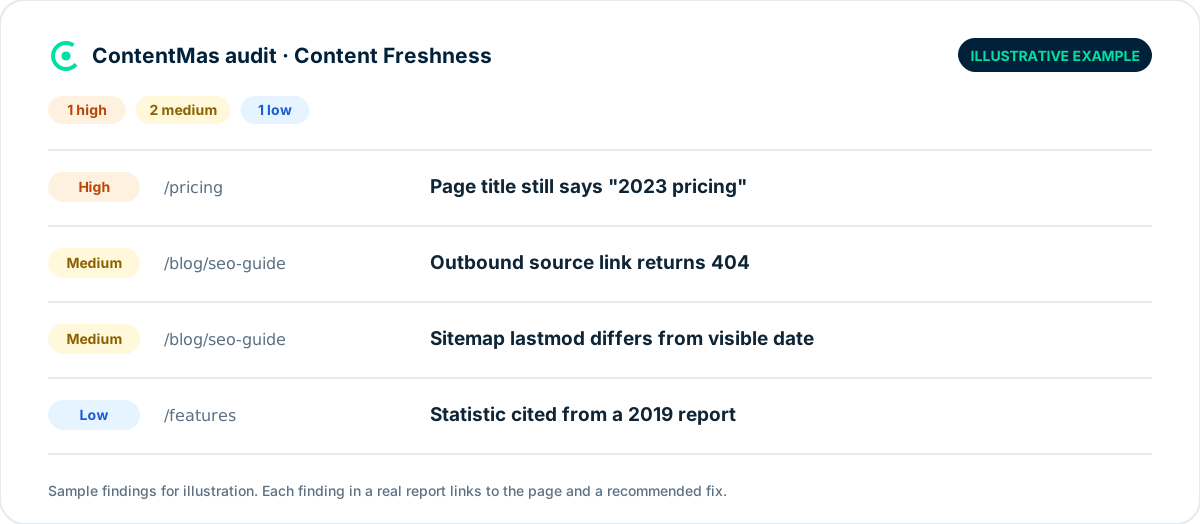
A common template problem is a theme that sets dateModified to the build date, or a sitemap plugin that stamps every URL with today. A common site-level one is a cluster of 404s from a past redesign that never got redirects.
What can you fix today?
You can fix the most visible signs in an afternoon. We recommend this order:
- Search for past years in titles and H1s on your 20 most-visited pages. Update the content first, then the year.
- Open Search Console's Pages report and export "Not found (404)" URLs. Redirect the ones that had traffic or links to the closest live page.
- Check one post's three dates. If visible date,
dateModifiedand<lastmod>disagree, fix the template, not the post. - Stop automatic date bumps. Turn off any setting that changes dates on every build or footer edit.
- Re-check the numbers on your top five pages. Replace or remove any you cannot trace to a current source.
- Walk the pricing and product pages with your live product open. Update screenshots, prices and plan names.
- Retire expired pages. Redirect or remove past events, ended offers and closed job posts.
How ContentMas checks this
The Content Freshness pillar in ContentMas reads your key pages the way a search engine or AI assistant would. It looks for outdated years and time-sensitive phrases in copy, checks whether visible dates, structured data dates and sitemap dates line up, flags dates that change without real edits, and checks links and sources on each page. It is one of six pillars in an audit of 600+ KPIs.
Every finding gets a priority (critical, high, medium or low) and a fix recommendation, so you know what to do first. ContentMas measures your site itself, not how often AI tools mention you. The How we score page explains how findings become scores.
To see which of the seven signs show up on your site, run a free audit. The free plan reads up to 50 pages per scan, with no credit card.
Related reading: Why content decay is silently killing your SEO rankings · The content audit checklist every marketing team needs · Can AI crawlers read your website?
Frequently asked questions
How often should I update my website content?
Google sets no fixed schedule. We recommend reviewing your most valuable pages every quarter, and any page with prices, statistics or years whenever those facts change. Freshness matters most for queries where people expect recent information.1
Does changing the date on a page help SEO?
Not on its own. Google lists changing page dates to make them seem fresh, without substantial changes, as a warning sign of search engine-first content.8 Update the date after a real edit, and keep the visible and structured dates in sync.6
Does updating the copyright year in the footer make my site look fresh?
No. Google's sitemap guidance says an update to the copyright date is not a significant change to a page.7 It is fine to keep the year current, but it does not count as a content update.
Do broken links hurt SEO?
Pages that return a 404 or other 4xx status are not indexed, and indexed pages are removed once they start returning one.2 Broken outbound links do not trigger that, but in our view they make a page less useful and less trustworthy to readers. Link rot is common: Pew found 23% of news webpages had at least one broken link.4
What is the difference between dateModified and lastmod?
dateModified sits in a page's structured data and describes when that page was last updated; Google asks that it match the visible date.6 <lastmod> sits in your XML sitemap and should reflect the last significant update to the page; Google uses it only when it is consistently accurate.7
References
Each numbered marker in the article links to its source below.
-
Google Search Central — A guide to Google Search ranking systems (opens in a new tab), December 2025. ↩
-
Google for Developers — How HTTP status codes affect Google's crawlers (opens in a new tab), February 2026. ↩
-
Aggarwal et al., arXiv — GEO: Generative Engine Optimization (opens in a new tab), June 2024. ↩
-
Pew Research Center — When Online Content Disappears (opens in a new tab), May 2024. ↩
-
Ahrefs — At Least 66.5% of Links to Sites in the Last 9 Years Are Dead (Ahrefs Study on Link Rot) (opens in a new tab), February 2024. ↩
-
Google Search Central — Add a byline date to Google Search results (opens in a new tab), December 2025. ↩
-
Google Search Central — Build and submit a sitemap (opens in a new tab), July 2026. ↩
-
Google Search Central — Creating helpful, reliable, people-first content (opens in a new tab), October 2026. ↩
About this article
Written by the ContentMas Team, the people who build ContentMas, a website audit tool that checks sites across six pillars for search engines and AI assistants. Facts and figures link to their original sources in the References. Spotted something out of date? Tell us and we will correct it.
Free website audit
See how your site scores for search engines and AI assistants.
One score, six pillar scores and a ranked fix list in a few minutes. No credit card.
Start free audit