
Technical Readiness
Can AI Crawlers Read Your Website? A 10-Minute Technical Check
Many AI crawlers read only raw HTML and obey robots.txt. Check access, noindex, rendering, status codes, canonicals, sitemap, speed and schema in 10 minutes.
On this page
- Why does a site look fine in the browser but not show up in search or AI answers?
- Do AI crawlers render JavaScript?
- How do you check if AI crawlers can read your website in 10 minutes?
- What does good look like for each check?
- Is Cloudflare blocking AI crawlers on my site?
- Why do canonicals and sitemaps matter for AI search?
- What does a technical audit usually find?
- How ContentMas checks this
- Frequently asked questions
Short answer
In short: maybe not, even if the site looks perfect in your browser. Major AI crawlers do not run JavaScript, so content that only appears after scripts load is invisible to them,1 and a robots.txt rule, a noindex tag or a CDN bot setting can shut them out entirely. The eight checks below take about ten minutes and show whether search engines and AI assistants can actually read your pages.
The usual complaint: "The site looks fine, but it doesn't show up in Google or in AI answers." A browser is a forgiving reader. It runs every script, follows every redirect and ignores robots.txt. Crawlers are stricter.
This guide covers the plumbing, not the writing. For the content side, see our guide to optimizing content for ChatGPT, Perplexity and AI Overviews.
Why does a site look fine in the browser but not show up in search or AI answers?
Because a crawler sees a different version of your site than you do. It may be blocked before it reaches the page, it may get an error code or a long redirect chain, or it may receive an empty HTML shell that only becomes a page once JavaScript runs.
None of this shows on screen. A page can load fast for visitors while a noindex rule tells Google to keep it out of search results.2 The 2024 Web Almanac shows how common such signals are: the noindex rule appeared in the rendered HTML of 3.9% of mobile pages, and 7.40% of mobile pages failed Lighthouse's check for a valid robots.txt file.3 Some are deliberate; some are staging leftovers.
Do AI crawlers render JavaScript?
Most do not. Vercel tested the major AI crawlers across its network and found that none of them rendered JavaScript; ChatGPT's and Claude's crawlers fetched JavaScript files but did not run them.1 Google's Gemini is the exception, because it uses Googlebot's infrastructure, which renders pages.1
Google itself renders JavaScript as a separate step after crawling, but it still says server-side or pre-rendering "is still a great idea" because not all bots can run JavaScript.4 The practical rule: your main text, headings, links and structured data should be in the HTML the server sends, not added later by a script.
The same study found that ChatGPT's crawler spent 34.82% of its fetches on 404 pages and another 14.36% following redirects, compared with 8.22% and 1.49% for Googlebot.1 Broken and moved URLs waste a lot of AI crawler effort.
How do you check if AI crawlers can read your website in 10 minutes?
Pick your home page and one key inner page, such as pricing. Each step takes about a minute.
- Read your robots.txt. Open
yourdomain.com/robots.txt. Look forDisallow: /underUser-agent: *or under named AI bots. Our AI visibility guide explains which OpenAI, Perplexity and Google crawlers control search inclusion and which only control training. - Check your CDN's bot settings. If you use Cloudflare or a similar service, open its bot or AI crawler settings and confirm they match what you want (see the next section).
- Look for
noindex. View the page source and search fornoindex. Then check the response headers (browser DevTools, Network tab) for anX-Robots-Tagheader. Google supports that header for non-HTML files such as images.2 - Compare view source with the rendered page. Press Ctrl+U (Cmd+Option+U on Mac) and search for a sentence from the middle of your page. If it is not in the source, it is loaded by JavaScript, and many AI crawlers will not see it.1
- Check the status code and redirects. Run
curl -I https://yourdomain.com/pageor use a redirect checker. You want200on the final URL in one hop at most. Google doesn't index URLs that return a 4xx code, and its crawlers follow up to 10 redirect hops by default.5 We recommend a single hop, since other crawlers may give up sooner. - Check the canonical tag. Search the source for
rel="canonical". It should point to the page's own clean URL, written as an absolute URL, as Google advises.6 - Open your sitemap. Try
yourdomain.com/sitemap.xmland look for aSitemap:line in robots.txt. Confirm the important page is listed with its full URL.7 - Test speed and structured data. Run the page through PageSpeed Insights, then through Google's Rich Results Test to catch schema errors.8
If one step fails, fix it before any content work. Content cannot help a page crawlers cannot read.
What does good look like for each check?
| Check | How to test in 1 minute | What good looks like | Tool |
|---|---|---|---|
| robots.txt | Open /robots.txt and read the rules | Pages you want found are not disallowed for search crawlers | Browser |
| CDN bot settings | Review AI crawler settings in your CDN dashboard | Settings match your choice; new Cloudflare domains are asked at sign-up9 | Cloudflare dashboard |
| noindex / X-Robots-Tag | Search source for noindex; read response headers | No noindex on pages you want in search; the page is crawlable so the rule can be read2 | View source, DevTools |
| Server-rendered HTML | Find a key sentence in view source | Main text, links and schema are in the raw HTML14 | View source |
| Status codes and redirects | curl -I the URL | 200 on the final URL, at most one redirect hop; never 4xx for live pages5 | curl, redirect checker |
| Canonical tag | Search source for rel="canonical" | One absolute URL pointing to the preferred version6 | View source |
| XML sitemap | Open /sitemap.xml | Absolute URLs, under 50,000 URLs or 50 MB per file, listed in robots.txt7 | Browser, Search Console |
| Core Web Vitals | Run PageSpeed Insights | LCP ≤ 2.5 s, INP ≤ 200 ms, CLS ≤ 0.1 at the 75th percentile10 | PageSpeed Insights |
| Structured data | Paste the URL into the Rich Results Test | No errors; JSON-LD that matches the visible content8 | Rich Results Test |
A note on Core Web Vitals: the thresholds are measured at the 75th percentile of real page views, so at least three in four visits need to meet each one.10 Speed is not a gate like robots.txt, but slow pages hurt the visitors crawlers send you.
Is Cloudflare blocking AI crawlers on my site?
It might be, and you may not have chosen it. Since July 2025, Cloudflare blocks AI crawlers that access content without permission by default, and it asks every new domain at sign-up whether to allow them.9
Cloudflare says customers can check their settings and enable crawling at any time.9 If your site sits behind Cloudflare, or any CDN or firewall with bot rules, make this a deliberate decision. A common pattern is that the setting was chosen during setup by whoever configured DNS, and the marketing team never heard about it.
Blocking AI training is a valid choice. Just make sure you are not also blocking the search crawlers that decide whether you appear in AI answers.
Why do canonicals and sitemaps matter for AI search?
They tell crawlers which URL is the real one and where your important pages are. Google calls rel="canonical" "a strong signal" for which URL should become canonical, and it warns not to use robots.txt for canonicalization.6 In the 2024 Web Almanac, 65% of mobile pages had a canonical tag.3
When duplicates exist, such as tracking parameters or regional copies, a crawler may read the wrong version. Our guide on which pages to audit first explains how duplicates creep in.
Sitemaps help crawlers find pages that internal links miss. Google's limits are 50 MB uncompressed or 50,000 URLs per sitemap file, with absolute URLs, and you can point to the sitemap from robots.txt with a Sitemap: line.7
What does a technical audit usually find?
A technical audit usually finds a few small, fixable blockers rather than one big failure: a forgotten noindex, a canonical pointing at the wrong URL, a redirect chain left over from a migration, or a key section loaded only by JavaScript.
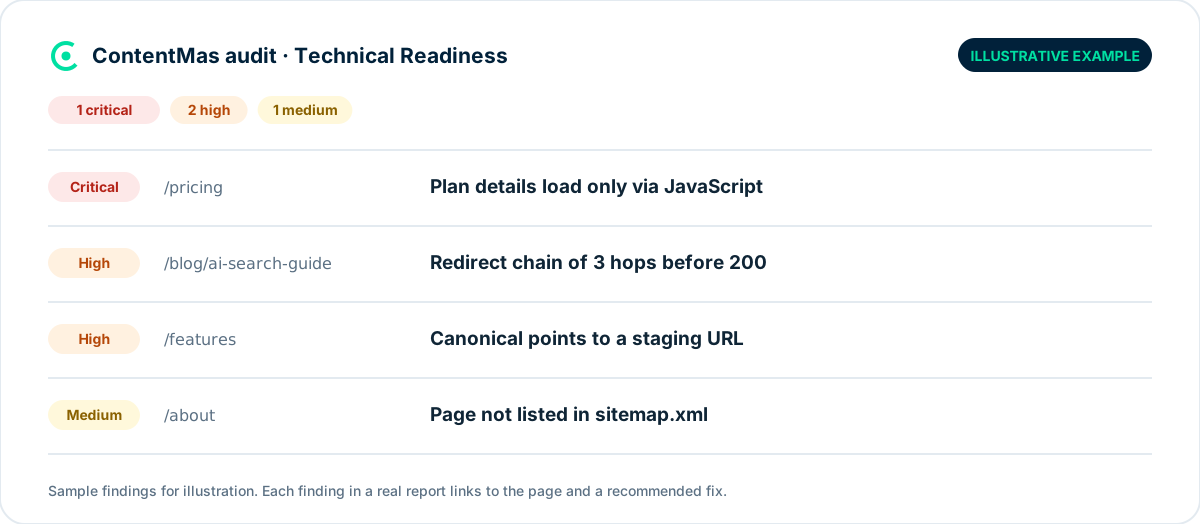
We recommend fixing in this order: anything that blocks access (robots.txt, CDN rules, noindex, 4xx and 5xx errors) first, then rendering, then canonicals and redirects, then sitemap, speed and schema. Google notes that 5xx errors make its crawlers temporarily slow down,5 so server errors cost crawl time on top of the missing page.
How ContentMas checks this
ContentMas audits your key pages against 600+ KPIs across six pillars. The Technical Readiness pillar looks at whether crawlers can reach and read each page: crawl and index signals, status codes and redirects, canonical and sitemap setup, how much content is in the server-sent HTML, page performance and structured data validity.
Every finding gets a critical, high, medium or low priority and a fix recommendation, so you know which blocker to remove first. ContentMas measures your site's readiness. It does not track how often AI tools mention you. Run a free audit on up to 50 pages, or read How we score to see how findings become scores.
Related reading: How to optimize your content for ChatGPT, Perplexity, and AI Overviews · SEO vs GEO · Website security, SEO and trust
Frequently asked questions
How do I know if AI crawlers can access my website?
Check robots.txt for rules that block AI bots, review your CDN's bot settings, and make sure your main content is in the page source rather than loaded by JavaScript. Major AI crawlers do not render JavaScript, so content missing from view source is likely missing for them too.1
Does blocking GPTBot remove my site from ChatGPT search?
Not by itself. OpenAI says OAI-SearchBot is used to surface sites in ChatGPT's search features, while GPTBot serves model training, and that each setting is independent of the others.11 Our AI visibility guide compares the main crawlers side by side.
Does Google need server-side rendering to index my site?
No. Google renders JavaScript as part of crawling and indexing.4 But Google still calls server-side or pre-rendering "a great idea" because not all bots can run JavaScript,4 and that includes most AI crawlers.1
Can a noindex tag work if robots.txt blocks the page?
No. Google says robots meta and X-Robots-Tag settings can be read and followed only if crawlers are allowed to access the page.2 If you want a page out of search, allow crawling and use noindex.
Do Core Web Vitals affect AI search visibility?
No AI platform we cite publishes speed as a rule for being used as a source. We still recommend meeting the "good" thresholds of LCP 2.5 seconds, INP 200 milliseconds and CLS 0.1,10 because the people who click through from search and AI answers land on that page.
References
Each numbered marker in the article links to its source below.
-
Vercel — The rise of the AI crawler (opens in a new tab), December 2024. ↩
-
Google Search Central — Robots meta tag, data-nosnippet, and X-Robots-Tag specifications (opens in a new tab), March 2026. ↩
-
HTTP Archive — Web Almanac 2024: SEO (opens in a new tab), 2024 edition. ↩
-
Google Search Central — Understand the JavaScript SEO basics (opens in a new tab). ↩
-
Google Search Central — How HTTP status codes, and network and DNS errors affect Google Search (opens in a new tab), February 2026. ↩
-
Google Search Central — How to specify a canonical with rel="canonical" and other methods (opens in a new tab), July 2026. ↩
-
Google Search Central — Build and submit a sitemap (opens in a new tab), July 2026. ↩
-
Google Search Central — General structured data guidelines (opens in a new tab), July 2026. ↩
-
Cloudflare via Business Wire — Cloudflare Just Changed How AI Crawlers Scrape the Internet-at-Large; Permission-Based Approach Makes Way for A New Business Model (opens in a new tab), July 2025. ↩
-
web.dev — How the Core Web Vitals metrics thresholds were defined (opens in a new tab), May 2025. ↩
-
OpenAI — Overview of OpenAI Crawlers (opens in a new tab). ↩
About this article
Written by the ContentMas Team, the people who build ContentMas, a website audit tool that checks sites across six pillars for search engines and AI assistants. Facts and figures link to their original sources in the References. Spotted something out of date? Tell us and we will correct it.
Free website audit
See how your site scores for search engines and AI assistants.
One score, six pillar scores and a ranked fix list in a few minutes. No credit card.
Start free audit