
Security
Free website security testing tools for non-developers
Six free website security testing tools compared: what each checks from outside (warnings, HTTPS, headers, malware, standards), and what none of them can see.
 By Nasir Ali Joiya, CEO and Co-Founder of ZAPTA TechnologiesPublished Updated 16 min read 13 sources cited
Summarize with AI
Short on time? Open this article in your AI assistant with a ready-made prompt.
- ChatGPT (opens in a new tab with a summary prompt)
- Perplexity (opens in a new tab with a summary prompt)
- Grok (opens in a new tab with a summary prompt)
Claude and Gemini open with the prompt copied: paste it to start.
On this page
- What does a free website security test actually check?
- Which free website security testing tools are worth using?
- How do you run a complete free website security test?
- What does none of these free tools check?
- How does ContentMas help with website security testing?
- Key takeaways
- Frequently asked questions
Short answer
In short: the free website security testing tools worth running are Google's Safe Browsing Site Status and Search Console for whether Google already flags your site,12 Qualys SSL Labs for the HTTPS certificate and configuration,3 MDN HTTP Observatory and Internet.nl for the security headers and standards a browser relies on,45 and Sucuri SiteCheck for visible malware, blacklisting and out-of-date software.6 All of them run from a browser, need no installation and finish in minutes. They test what an outsider can see. None of them can see server-side infections, hidden plugin versions or weak passwords,46 so treat a clean result as a good start, not a certificate.
You have been asked whether the company website is secure, and the honest answer is that nobody has checked. Chrome now warns visitors before loading a page over plain HTTP,7 Google can put a warning label on hacked pages in its results,2 and attackers increasingly get in through unpatched software: exploitation of vulnerabilities as the first step grew 34% in a year and now accounts for 20% of breaches.8
You do not need a penetration tester to find the basic problems. A handful of free tools, each run by a browser vendor, a security company or a public body, will tell you in half an hour whether your site is flagged, whether HTTPS is set up correctly and whether the protections a browser expects are switched on. This guide opens each tool's own page, says what it checks and cannot check, puts them in order, and ends with the gaps that remain after every free test comes back green.
What does a free website security test actually check?
A free website security test looks at your site from the outside, the way a visitor's browser or a search engine does, and compares what it sees with a known-good configuration. It does not log in, read your server files or try to break in.
That outside view covers four things: reputation (whether Google or other blocklists already consider the site dangerous),16 transport (whether the HTTPS certificate is valid and the encryption settings are current),3 browser protections (whether the HTTP security headers that stop common attacks are present),4 and visible symptoms such as injected scripts, defacements and software versions that announce themselves in the page source.6
It cannot cover anything below the surface. MDN's FAQ for the HTTP Observatory says the tool "does not test for outdated software versions, SQL injection vulnerabilities, vulnerable content management system plugins, improper creation or storage of passwords, and more."4 Sucuri says the same about its scanner: "Since the remote scanner only has access to what's visible on the browser level, it will not detect anything on the server-side."6
Which free website security testing tools are worth using?
Six free website security testing tools are worth using, and between them they cover the outside view. Each row is based on the tool's own page as of November 2026.
| Tool | Free tier today | What it checks | Best for |
|---|---|---|---|
| Google Safe Browsing Site Status | Free; any URL; no account1 | Whether Safe Browsing currently rates the site as dangerous1 | A 10-second answer to "is my site flagged?" |
| Google Search Console (Security Issues and HTTPS reports) | Free; verified sites only29 | Hacked content, malware, phishing; issues that stop pages being served over HTTPS29 | The warnings Google itself will show your visitors |
| Qualys SSL Labs Server Test | Free; any public web server; grades A+ to F103 | Certificate validity, protocol versions, key exchange, cipher strength, HTTP Strict Transport Security (HSTS)3 | Checking HTTPS is set up properly, not just present |
| MDN HTTP Observatory | Free; any public site; one scan per site per 60 seconds; results are public4 | CSP, HSTS, cookies, redirects to HTTPS, referrer policy, frame protection and other headers411 | Finding missing browser protections |
| Sucuri SiteCheck | Free remote scan; results not guaranteed6 | Known malware, blacklisting, website errors, out-of-date software, malicious code6 | Visible infections and blocklist status in one view |
| Internet.nl website test | Free; run by the Internet community and the Dutch government5 | IPv6, Domain Name System Security Extensions (DNSSEC), HTTPS, security headers, security.txt, Resource Public Key Infrastructure (RPKI)5 | A standards report you can hand to a hosting provider |
| ContentMas Free | Free; 10 pages per scan; 3 scans per 24 hours | Six pillars and 600+ checks, including Security alongside content freshness, quality and trust | Security findings in the same report as the content problems |
Source: compiled from the sources cited in each row.
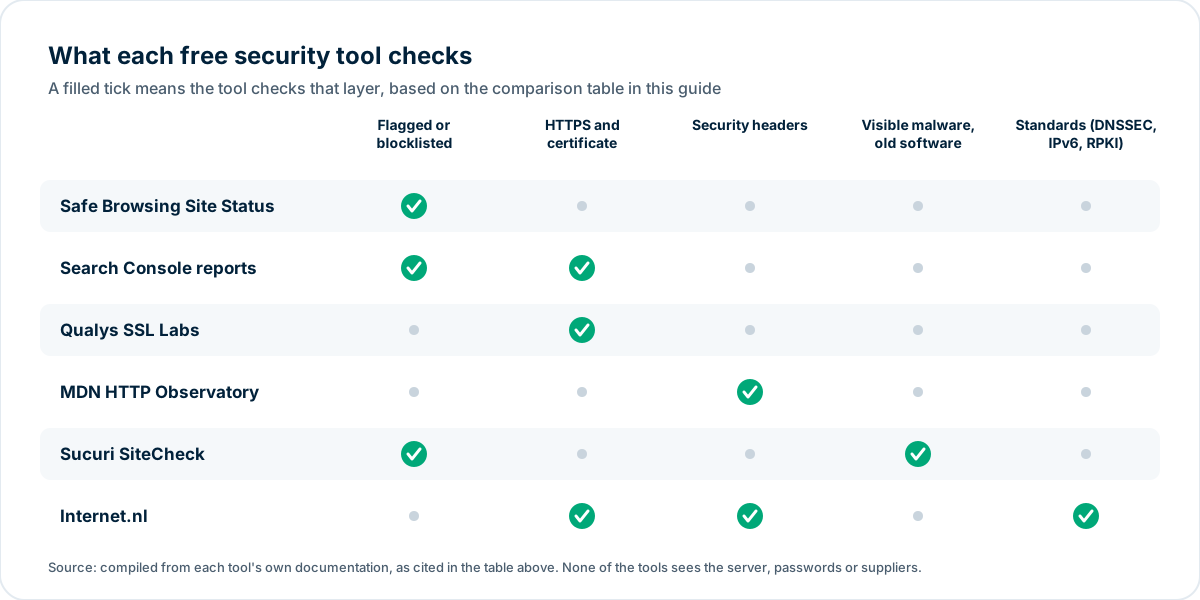
Source: compiled from the tool documentation cited in the table above.
Google Safe Browsing Site Status
Google Safe Browsing "helps protect over five billion devices every day by showing warnings to users" when they try to open dangerous pages.1 The Transparency Report includes a Site Status tool "that you can use to see whether a site currently contains content that Safe Browsing has determined to be dangerous."1 Type a URL, read the verdict. If it says the site is unsafe, visitors are already seeing a browser warning, and that is the first thing to fix.
Google Search Console: Security Issues and HTTPS reports
Search Console is free for sites you verify, and two of its reports are security tests in all but name. The Security Issues report is where Google tells you it has found a site hacked or harmful to visitors, whether hacked with spam, infected with malware or used for phishing.2 Until the problem is fixed, those warnings "will remain in search results and browsers as a caution to protect users."2 After you clean up, "Select Request a review" and explain how you cleaned the site; reviews for malware "require a few days to process," while reviews for sites hacked with spam "can require up to several weeks."2
The HTTPS report helps you "get insights about your HTTPS pages served on Search," and it "lists the issues that prevent pages from being served as HTTPS, along with sample URLs."9 Work through those issues until all your important pages are served over HTTPS.
Qualys SSL Labs Server Test
SSL Labs runs the test most people mean by "SSL check": "This free online service performs a deep analysis of the configuration of any SSL web server on the public Internet."10 Its rating guide was written "allowing administrators to assess SSL server configuration confidently without the need to become SSL experts."3 The test first checks the certificate; an untrusted certificate or a name mismatch gives a zero score, shown as a T or M grade.3 It then scores protocol support (30%), key exchange (30%) and cipher strength (40%), with A at 80 points or more, B from 65, C from 50 and F below 20.3 Current rules cap the grade at B if the server still supports TLS 1.0 or 1.1, and at A- if TLS 1.3 is missing or HSTS is disabled.3
An A or A+ means the connection is encrypted properly. It does not mean the site is secure: the guide itself says "SSL does not and cannot address a number of possible security issues that may exist on a web site."3
MDN HTTP Observatory
The HTTP Observatory, run by MDN (Mozilla's developer documentation site), "tests for preventative measures against Cross-site scripting (XSS) attacks, manipulator-in-the-middle (MiTM) attacks, cross-domain information leakage, insecure cookies, Content Delivery Network (CDN) compromises, and improperly issued certificates."4 In practice that means the HTTP response headers: Content Security Policy, Strict-Transport-Security, cookie flags, the HTTP to HTTPS redirect, Referrer-Policy, X-Content-Type-Options and frame protection.4 Scores run from 0 to a current maximum of 145 and map to grades from A+ (100 or more) to F (24 or less).11
Two things to know before you run it: "Anyone can choose to scan any domain, and the scan history for each domain is public," and "a site can only be scanned and a new result returned every 60 seconds."4 It does not look at TLS at all; that is SSL Labs' job.4
Sucuri SiteCheck
Sucuri's free scanner "will check the website for known malware, viruses, blacklisting status, website errors, out-of-date software, and malicious code."6 It is the closest thing on this list to a malware scan, and it also reports whether your CMS version is visibly out of date. Its disclaimer is honest: "Sucuri SiteCheck is a free website security scanner. Remote scanners have limited access and results are not guaranteed."6 A clean SiteCheck means nothing malicious is visible from outside, not that the server is clean.
Internet.nl website test
Internet.nl is "an initiative of the Internet community and the Dutch government."5 Its website test checks whether a site supports "modern Internet Standards": IPv6, DNSSEC, HTTPS, security options (HTTP security headers and security.txt) and RPKI.5 Each failed item links to an explanation, and the results page is something you can send to your hosting company with the words "please fix the red rows."
How do you run a complete free website security test?
A complete free website security test runs the six tools in this order. Each step takes a few minutes, and the order moves from "visitors are being warned right now" to "nice to have."
Step 1: Check whether you are already flagged
Put your homepage into Safe Browsing Site Status.1 If you have Search Console, open the Security Issues report.2 Anything here outranks everything below, because warnings are already costing you visitors.
Step 2: Test HTTPS
Run the SSL Labs test on your main hostname.10 Fix a T or M grade today (an untrusted or wrongly named certificate).3 Then open the Search Console HTTPS report and work through the issues it lists for pages not served as HTTPS.9 Since October 2026, Chrome "explicitly asks users for permission before making an insecure HTTP connection," for all users by default, so an HTTP page now interrupts the visitor before it loads.7
Step 3: Check the browser protections
Run the HTTP Observatory.4 A D or F usually means a few missing headers that a hosting panel, CDN or plugin can add in an afternoon: Strict-Transport-Security, X-Content-Type-Options, a Referrer-Policy and frame protection. Content Security Policy can break a site if set carelessly, so test it in report-only mode first or ask your developer.
Step 4: Look for visible infections and old software
Run Sucuri SiteCheck.6 If it reports out-of-date software, update it. In WordPress the risk is mostly in extensions: Patchstack counted 11,334 new vulnerabilities in the WordPress ecosystem in 2025, 42% more than in 2024; "91% of new vulnerabilities were found in plugins, and 9% were found in themes," and only six were reported in WordPress core.12 Nearly half, 46%, "did not receive a fix from the developer in time for public disclosure," which is why removing plugins you do not use matters as much as updating the ones you do.12
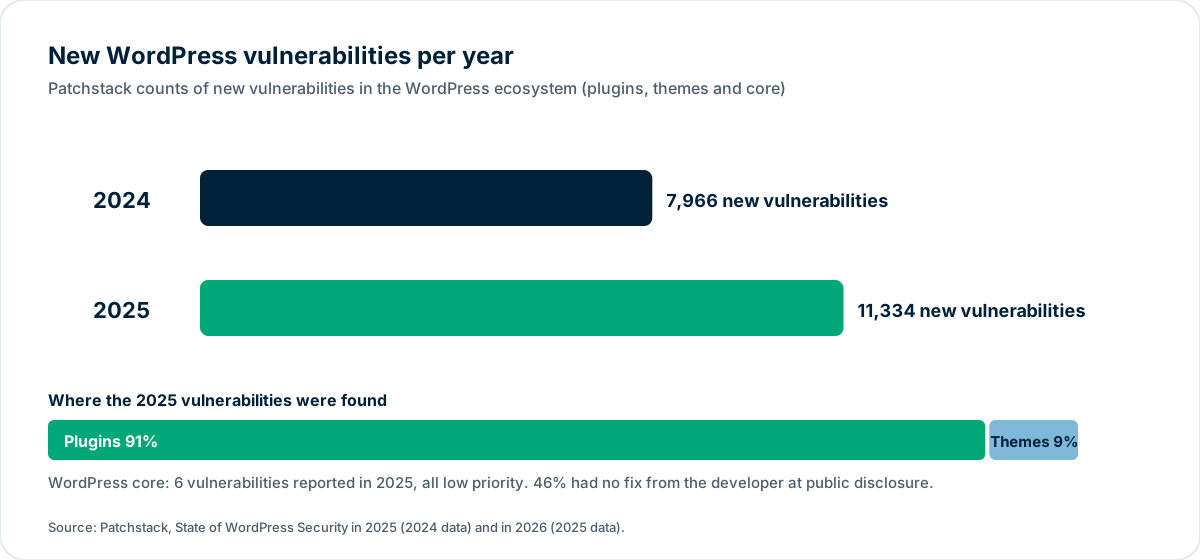
Source: Patchstack, State of WordPress Security in 2025 and in 2026.1213
Step 5: Run the standards report
Finish with Internet.nl.5 DNSSEC, IPv6 and RPKI are usually your registrar's or host's job; the report tells you which one to ask.
Step 6: Write down the date and repeat quarterly
A security test is a snapshot. Certificates expire, plugins age, and a hosting migration can silently drop every header you added. Keep the six results with the date, and run the set again every quarter and after any change of hosting, CMS or theme.
What does none of these free tools check?
Four things, and they are the ones behind most real incidents.
1. Whether the server itself is clean
Remote scanners see rendered pages. Sucuri says its scanner "will not detect anything on the server-side,"6 and MDN lists outdated software, SQL injection and vulnerable CMS plugins among the things the Observatory does not test.4 A backdoor or a phishing folder that is not linked from your pages passes every free test. Only a scan with file access can find them.
2. Whether logins are protected
No outside test can tell whether the admin account uses a reused password, whether two-factor authentication is on, or how many former contractors still have access. Verizon's 2025 report, built on over 22,000 incidents and 12,195 confirmed breaches, puts credential abuse at 22% of breaches, the largest initial access vector, just ahead of vulnerability exploitation at 20%.8
3. Whether your suppliers are secure
The same report found that "third-party involvement in breaches has doubled to 30%."8 Your payment widget, chat tool, form service and analytics script all run on your pages. The free tools above test your domain, not theirs.
4. Whether the content gives visitors a reason to trust you
A site can pass every technical test and still look unsafe to a person or an AI assistant: no company address, no named people, a privacy policy dated 2019, claims without sources. Those are the trust signals AI assistants look for, and no security scanner reads them. The guide to how website security affects rankings and trust covers how the two sides fit together.
How does ContentMas help with website security testing?
ContentMas is an AI-powered SEO tool that audits your website for Google and AI search engines, and shows exactly what to fix to rank higher and get cited. It is not a malware scanner or a penetration test, and it does not replace the six tools above. It reads your key pages the way a visitor, a search engine and an AI assistant do and reports on six pillars: Content Freshness, Content Quality, Trust & Authenticity, SEO & GEO Readiness (visibility in Google and AI search engines; GEO means Generative Engine Optimization), Technical Readiness and Security. The Security pillar covers the outside view described here (HTTPS, redirects, security headers and exposed details); the other five cover what security tools leave out: outdated dates and statistics, missing authors and contact details, unsourced claims and pages AI crawlers cannot read.
The free plan reads up to 10 pages per scan, 3 scans per 24 hours; paid plans read 100, 200 or 500 pages. Each finding comes with a priority and a fix. See how we score or run an audit.
Key takeaways
- Six free website security testing tools cover the outside view: Safe Browsing Site Status and Search Console for warnings, SSL Labs for HTTPS, HTTP Observatory and Internet.nl for headers and standards, Sucuri SiteCheck for visible malware and old software.124365
- Start with the warnings. A Safe Browsing flag or a Security Issues entry means visitors already see a warning page, and a review after cleanup takes from a few days for malware to several weeks for spam hacks.12
- HTTPS is no longer optional in practice: Chrome now asks users for permission before loading an HTTP page, by default.7 An SSL Labs T or M grade is a same-day fix.3
- Security headers are the cheapest win. The Observatory's grades exist "to alert developers when they're not taking advantage of the latest web security features," and most missing headers can be added from a hosting panel.11
- Out-of-date plugins are the WordPress risk: 91% of the 11,334 vulnerabilities found in 2025 were in plugins, and 46% had no fix at disclosure.12
- No free remote tool sees the server, the passwords or your suppliers. Credential abuse (22%), vulnerability exploitation (20%) and third parties (30% of breaches) all sit outside their view.468
Run the six tests this week, write down the grades, fix the red items in order, and repeat each quarter. That closes the problems a visitor's browser notices first.
Related reading: How Website Security Affects Rankings and Customer Trust and Can AI Crawlers Read Your Website? A 10-Minute Technical Check
The six-pillar guides: Technical · Content quality · Trust · Freshness · Security · SEO and GEO · How ContentMas scores each pillar
Frequently asked questions
What is the best free website security testing tool?
There is no single one, because each tests a different layer. For a flagged-site check use Google Safe Browsing Site Status,1 for HTTPS use the Qualys SSL Labs test,3 for security headers use MDN HTTP Observatory,4 and for visible malware and out-of-date software use Sucuri SiteCheck.6 Running all four takes about 15 minutes.
Is an A+ on SSL Labs or HTTP Observatory proof that my website is secure?
No, an A+ means only that one layer is configured well. SSL Labs' guide says "SSL does not and cannot address a number of possible security issues that may exist on a web site,"3 and MDN says the Observatory "does not test for outdated software versions, SQL injection vulnerabilities, vulnerable content management system plugins, improper creation or storage of passwords, and more."4
Can a free online scanner detect malware on my website?
Only malware that is visible from outside. Sucuri SiteCheck checks the pages it can load for known malware, blacklisting and malicious code, but "remote scanners have limited access and results are not guaranteed" and it "will not detect anything on the server-side."6 Hidden backdoors need a scan with file access.
Why does Chrome warn visitors that my site is not secure?
Since October 2026, Chrome asks users for permission before making an insecure HTTP connection (opens in a new tab), and the setting is on for all users by default.7 The fix is a valid HTTPS certificate plus a redirect from every HTTP URL; the Search Console HTTPS report lists the issues that keep pages from being served as HTTPS, with sample URLs.9
How often should I run a website security test?
Run a website security test every quarter, and after any change of hosting, CMS, theme or major plugin. Certificates expire and new plugin vulnerabilities appear constantly (11,334 in the WordPress ecosystem in 2025),12 so last year's result says little about today.
References
Each numbered marker in the article links to its source below.
-
Google — Google Safe Browsing (opens in a new tab), accessed November 2026. ↩
-
web.dev (Google) — Request a review (opens in a new tab), accessed November 2026. ↩
-
Qualys SSL Labs — SSL Server Rating Guide, version 2009r (opens in a new tab), May 2025. ↩
-
MDN — HTTP Observatory: Frequently asked questions (opens in a new tab), accessed November 2026. ↩
-
Internet.nl — About the website test (opens in a new tab), accessed November 2026. ↩
-
Sucuri — Free website malware and security checker (SiteCheck) (opens in a new tab), accessed November 2026. ↩
-
Google — Chrome now warns before insecure HTTP connections (opens in a new tab), October 2026. ↩
-
Verizon — 2025 Data Breach Investigations Report (opens in a new tab), April 2025. ↩
-
Google Search Central Blog — The new HTTPS report in Search Console (opens in a new tab), September 2022. ↩
-
Qualys SSL Labs — SSL Server Test (opens in a new tab), accessed November 2026. ↩
-
MDN — HTTP Observatory Scoring Methodology (opens in a new tab), accessed November 2026. ↩
-
Patchstack — State of WordPress Security in 2026 (opens in a new tab), February 2026. ↩
-
Patchstack — State of WordPress Security in 2025 (opens in a new tab), March 2025. ↩
About this article
Written by Nasir Ali Joiya. Nasir Ali Joiya is a software engineer and the CEO and Co-Founder of ZAPTA Technologies, an AI-native software company in Lahore whose group has more than 150 engineers. Reviewed by the ContentMas Team, who build ContentMas, an AI-powered SEO audit tool that checks sites across six pillars for Google and AI search engines. Facts and figures link to their original sources in the References. Last reviewed November 8, 2026. Spotted something out of date? Tell us and we will correct it.
Free website audit
See how your site scores for search engines and AI assistants.
One score, six pillar scores and a ranked fix list in a few minutes. No credit card.
Start free audit