
Course highlights · Lesson 5 of 5
Dates, lastmod and real content updates
By Nasir Ali Joiya · Published · 4 min read
Dates, lastmod and real content updates work together: one labeled date near the headline, the same date in structured data and the sitemap lastmod, and a new date only after a real update. A real content update is a change that alters what a reader learns from the page. Google relies on consistent, accurate dates, and a new date on unchanged content is easy to spot.
Key takeaways on dates and content updates
- Show one labeled byline near the headline, and match it in datePublished and dateModified.
- Keep sitemap lastmod accurate for each page; Google uses it only when it is verifiably accurate.
- Change the timestamp only when the content really changes: real work deserves a real date.
Where should the visible date go?
The visible byline sits close to the headline, with a label. Google's byline date guidance asks for a user-visible date that is featured prominently, labeled with text such as "Published" or "Last updated". If Google picks the wrong date, the same guidance suggests removing or minimizing other dates near the article, such as dated lists of related posts.
Which date signals should agree?
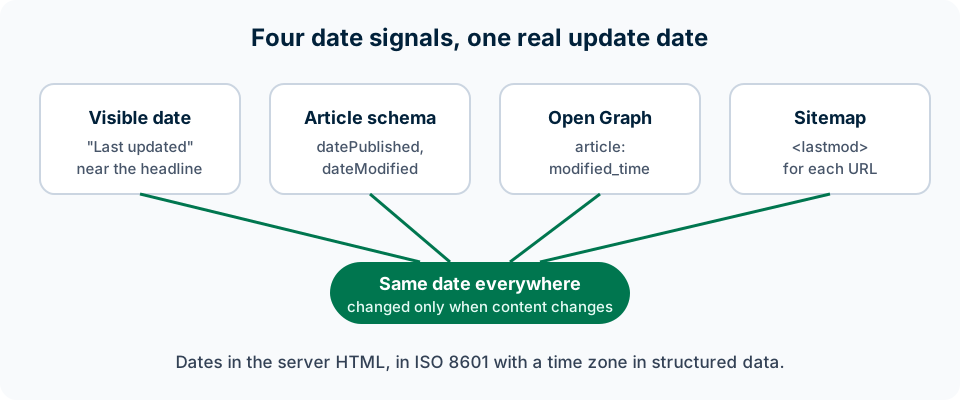
Four signals should agree, and Google's guidance is to keep dates and times consistent:
| Signal | Where it lives | What it holds |
|---|---|---|
| Visible date | On the page, near the headline | "Published" or "Last updated" |
| datePublished and dateModified | Article structured data | ISO 8601 date and time with a time zone |
| article:modified_time | Open Graph sharing tags | The latest update |
| lastmod | XML sitemap | The last significant update |
Put each of them in the HTML the server sends. Google's JavaScript SEO guide notes that not all bots run JavaScript, so a timestamp added only by a script may never reach them.
When does Google use sitemap lastmod?
Google uses sitemap lastmod when it is consistently and verifiably accurate, and ignores the priority and changefreq fields. Google's sitemap guide says lastmod should reflect the last significant update, such as changes to the main content, the structured data or on-page links. A new copyright year in the footer is not significant. Give each URL its own lastmod, taken from when its content last changed, rather than one generated value for the whole sitemap.
What counts as a real update?
A real update changes what a reader learns from the page. Google's 2019 guidance says that a significant update to a page should also show in its visible byline.
- Worth a new timestamp: new facts or sections, updated figures, corrected advice, replaced screenshots.
- Keeps the old one: a typo fix, reordered paragraphs, a new footer year.
Google's helpful content guide asks whether pages get new timestamps to seem fresh when the content has not substantially changed, and Google News guidelines rule out artificially freshening a story.
Why are fake date bumps easy to spot?
Fake date bumps are easy to spot because earlier copies of a page usually exist. Search engines keep copies of what they crawled, and the Wayback Machine stores public snapshots, so anyone can see when a timestamp moved and the words did not. The Ahrefs study of 17 million citations found that AI assistants prefer to cite fresher content, and it notes that Google's John Mueller has warned against changing dates without real content changes.
Questions about dates and content updates
- Should I change the date after fixing a typo?
- No. A typo fix or reordered paragraphs do not change what a reader learns. Save new timestamps for significant updates such as new facts, figures or corrected advice.
- Does Google read the lastmod date in my sitemap?
- Yes, when it is consistently and verifiably accurate. A sitemap that shows the same fresh value for every page every day looks unreliable.
- Can JavaScript add the date to my page?
- It can, but some crawlers will not see it. Put the visible byline and the structured data in the HTML the server sends.
More on dates and content updates
Sources for this lesson on dates and content updates
- Influence your byline dates in Google Search (Google Search Central)
- Article structured data (Google Search Central)
- Build and submit a sitemap (Google Search Central)
- Creating helpful, reliable, people-first content (Google Search Central)
- Best practices for your article pages (Google Publisher Center Help)
- Help Google Search know the best date for your web page (Google Search Central Blog, March 2019)
- New Study: AI Assistants Prefer to Cite "Fresher" Content (Ahrefs, 28 July 2025)
- Save Pages in the Wayback Machine (Internet Archive Help Center)
- Understand JavaScript SEO basics (Google Search Central)
Free website audit
Check this on your site with a free ContentMas scan
One score, six pillar scores and a ranked fix list in a few minutes. No credit card.
Start free audit